Most people don’t have a productivity problem because they lack enough apps.
The real problem is that their apps don’t talk to each other.
A lead arrives through a form. Someone copies the information into a spreadsheet. An email has to be sent manually. A notification needs to be posted in Slack. Then someone updates a CRM.
Each individual task is simple.
The problem is doing the same thing again and again.
This is where Zapier comes in.
Zapier started with a simple idea: connect the apps you already use and let automation handle the repetitive work between them. Today, the platform has expanded into a broader automation and AI orchestration system, connecting more than 9,000 applications and adding AI-powered steps, data storage, forms, MCP, and agentic capabilities.
So what exactly can Zapier do today, and is it still useful if you’re not running a large business?
Let’s take a closer look.
What Is Zapier?
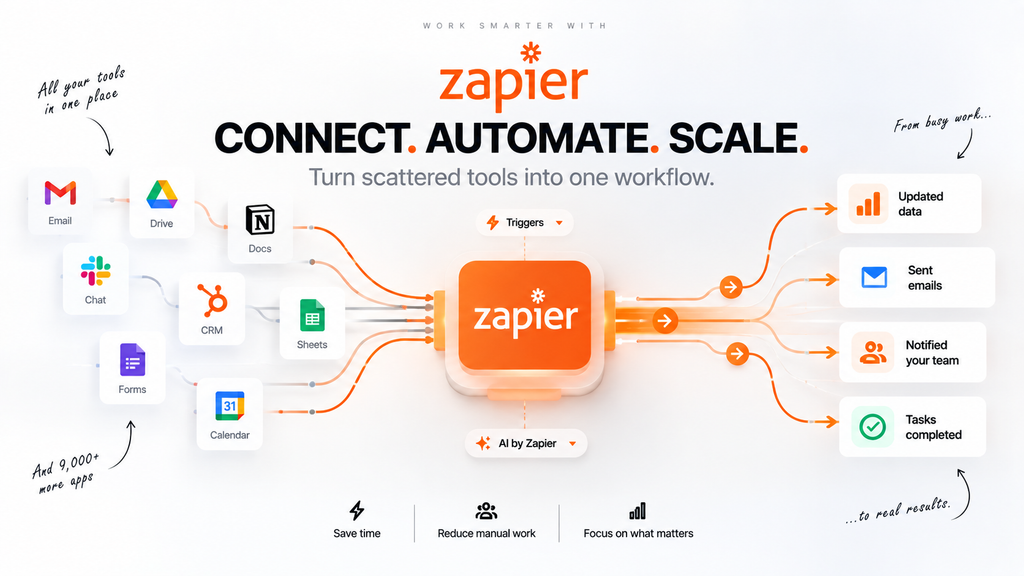
Zapier is an automation platform that connects different applications so they can work together without requiring traditional programming.
The basic idea is simple:
Something happens → Zapier notices → Zapier performs an action.
For example:
New website form submission → Add the contact to a spreadsheet → Send an email → Notify your team
Each automated workflow is called a Zap.
Instead of manually repeating the same sequence every time something happens, you create the workflow once and let Zapier run it automatically.
Zapier currently describes its platform as infrastructure for AI-powered automation, with no-code, low-code, and full-code options available.
That shift is important because modern Zapier is much broader than the simple trigger-and-action automation it became known for.
The Real Idea Behind Zapier
Zapier becomes easier to understand when you stop thinking of it as another productivity app.
It is more like a connection layer between your other apps.
Imagine a small business using:
- Gmail for email
- Google Sheets for data
- Slack for communication
- HubSpot for customer management
- Stripe for payments
- Typeform for collecting information
Without automation, employees may have to move information between these systems manually.
With Zapier, those applications can become part of the same workflow.
For example:
New customer submits a form
↓
Zapier receives the information
↓
Customer is added to CRM
↓
AI analyzes the request
↓
Personalized email is drafted
↓
Team receives a notification
The individual apps don’t need to be replaced.
Zapier simply connects them.
That is the core idea behind the platform.
How Zapier Automation Works
A typical Zap has two fundamental components:
Trigger
The trigger is the event that starts the workflow.
Examples include:
- A new email arrives
- A form is submitted
- A new payment is received
- A new spreadsheet row is created
- A calendar event is added
- A customer is added to a CRM
Action
The action is what Zapier does after the trigger occurs.
Examples include:
- Send an email
- Create a record
- Add a spreadsheet row
- Send a Slack message
- Generate AI content
- Update a CRM
- Create a task
A basic workflow therefore looks like:
Trigger → Action
But Zapier can go considerably further than that.
Multi-step workflows can contain multiple actions, filters, paths, loops, webhooks, schedules, and AI-powered steps.
Where AI Changes Zapier
Traditional automation follows rules.
For example:
If a new order arrives, send an email.
The workflow doesn’t need to understand the order.
It simply follows the rule.
AI introduces another layer.
Instead of only following fixed instructions, an AI step can interpret information and make a decision based on its contents.
For example:
New customer message
↓
AI identifies the customer’s intent
↓
If it is a sales inquiry → send to sales
If it is a support question → send to support
If it is urgent → notify the appropriate team
This is where Zapier’s current AI capabilities become particularly interesting.
AI by Zapier
AI by Zapier brings AI directly into the automation workflow.
According to Zapier, AI can be used for tasks such as:
- Summarizing information
- Classifying content
- Drafting text
- Extracting information
- Making decisions
- Using connected tools
- Processing information inside automated workflows
The important difference is that the AI does not have to exist separately from the automation.
It can become one step inside the workflow.
For example:
New support email
→ AI reads the message
→ AI identifies the category
→ Zapier chooses the appropriate path
→ Customer information is updated
→ Team receives the relevant notification
This combines AI reasoning with deterministic automation.
That combination is one of the more useful ideas behind modern Zapier.
Zapier Copilot
Building an automation from scratch can still be intimidating if you don’t know exactly which trigger, action, or app you need.
Zapier’s AI features can help with this through Copilot and AI-powered Zap building.
Instead of manually searching through every available option, users can describe the workflow they want.
For example:
“When someone fills out my contact form, add them to my CRM and notify me in Slack.”
The AI can help turn that description into a workflow.
Zapier says Copilot and its AI Zap builder can suggest trigger and action steps based on a natural-language description.
This makes automation more accessible to people who understand the process they want to automate but don’t necessarily know how to configure every technical step.
AI Agents and Autonomous Tasks
Zapier has also been moving toward more agentic automation.
Rather than simply telling AI what to write, an AI-powered workflow can be given access to tools and applications so it can perform actions.
This creates a spectrum:
Simple automation
If X happens, do Y.
AI-assisted automation
If X happens, use AI to understand the information, then do Y.
Agentic automation
Give the AI a goal and access to relevant tools so it can determine and execute the necessary actions.
Zapier is currently moving its standalone Agents experience into AI by Zapier, bringing agentic behavior directly into the Zap editor. This allows AI reasoning and tool calls to exist alongside normal automation steps rather than operating as a completely separate workflow.
That means a single automation can combine:
AI reasoning + normal actions + conditions + app integrations
instead of forcing users to choose between fully manual rules and fully autonomous AI.
Zapier’s 9,000+ App Ecosystem
One of Zapier’s biggest advantages is its application ecosystem.
Zapier currently advertises connections to 9,000+ apps.
That includes categories such as:
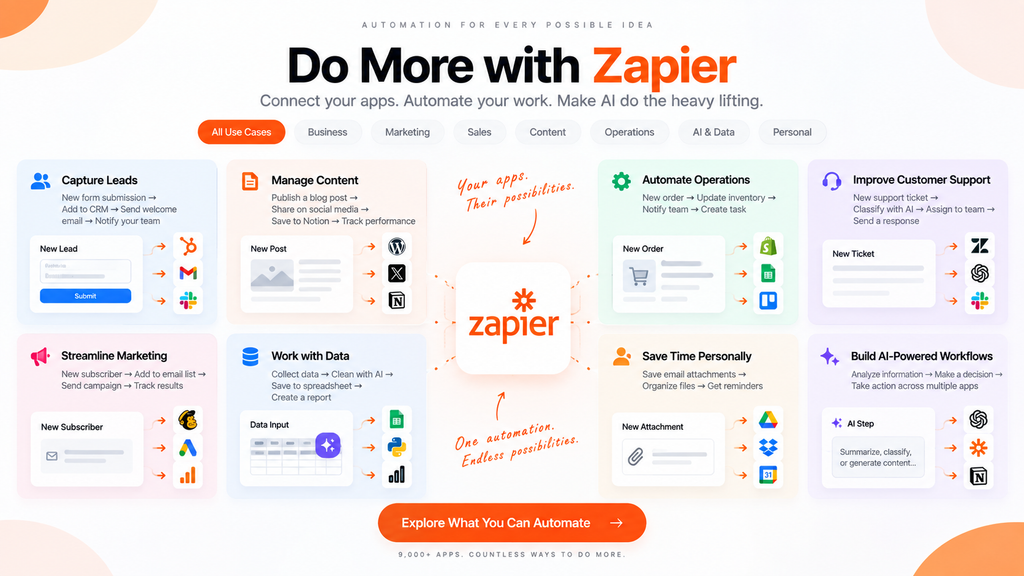
- CRM
- Marketing
- Project management
- Communication
- Payments
- Spreadsheets
- Forms
- AI tools
- Databases
- E-commerce
- Analytics
This matters because automation becomes more useful as the number of connected systems increases.
A workflow doesn’t have to live inside one application.
It can move information between several different tools.
For example:
Website → Form → CRM → AI → Email → Slack
all within one automated process.
Zapier Tables and Forms
Zapier has also expanded beyond traditional app-to-app automation.
Zapier Tables
Tables provide a no-code way to store, edit, access, and share structured information that can power workflows.
This means Zapier can do more than simply move information between external apps.
It can also provide a place for workflow data to live.
AI fields can be used to process information stored inside Tables, including generating content based on table data.
Zapier Forms
Forms allow users to create automation-ready forms.
A form can become the starting point of a workflow.
For example:
Customer submits form → Data enters Zapier → AI processes it → CRM is updated → Notification is sent
This creates a simple way to turn an ordinary form into the entry point for an automated process.
Zapier MCP
Another interesting development is Zapier MCP.
MCP allows compatible AI clients to interact with applications through Zapier.
Zapier says its MCP system can connect AI clients such as ChatGPT, Claude, and Cursor to applications available through Zapier, allowing those AI systems to take actions across connected apps.
This creates an interesting relationship between AI assistants and automation.
Instead of:
AI gives you instructions → You perform the actions
the workflow can become:
AI understands the request → AI calls the appropriate tool → Zapier performs the action
For users building AI-powered workflows, this can turn Zapier into an action layer between an AI assistant and the applications they use every day.
Real-World Zapier Use Cases
The best way to understand Zapier is to look at what you can actually automate.
1. Lead Management
A potential customer fills out a form.
Zapier can:
- Capture the lead
- Add it to a CRM
- Enrich or classify the information
- Notify the sales team
- Send a follow-up email
A process that previously required several manual actions can become one automated workflow.
2. Content Workflows
Imagine publishing a new article.
A workflow could automatically:
New article published → Create social media draft → Generate summary → Add record to content database → Notify team
AI can be added when interpretation or content generation is required.
3. Customer Support
Incoming customer messages can be categorized automatically.
For example:
New support message → AI classifies the request → Route to the appropriate team → Create support record → Notify staff
The important part is that AI handles the interpretation while Zapier handles the predictable workflow.
4. E-commerce
A new order can trigger multiple actions:
New order → Update customer record → Send confirmation → Update inventory system → Notify fulfillment
The customer doesn’t need to know that several different applications are involved.
5. Internal Operations
Businesses can automate repetitive administrative processes such as:
- Employee onboarding
- Task creation
- Document collection
- Notifications
- Approvals
- Data synchronization
The larger the number of repetitive processes, the more useful workflow automation can become.
Zapier Pricing: What Do the Plans Cost?
Zapier’s pricing is based around different plans and task usage.
The current main platform plans are Free, Professional, Team, and Enterprise.
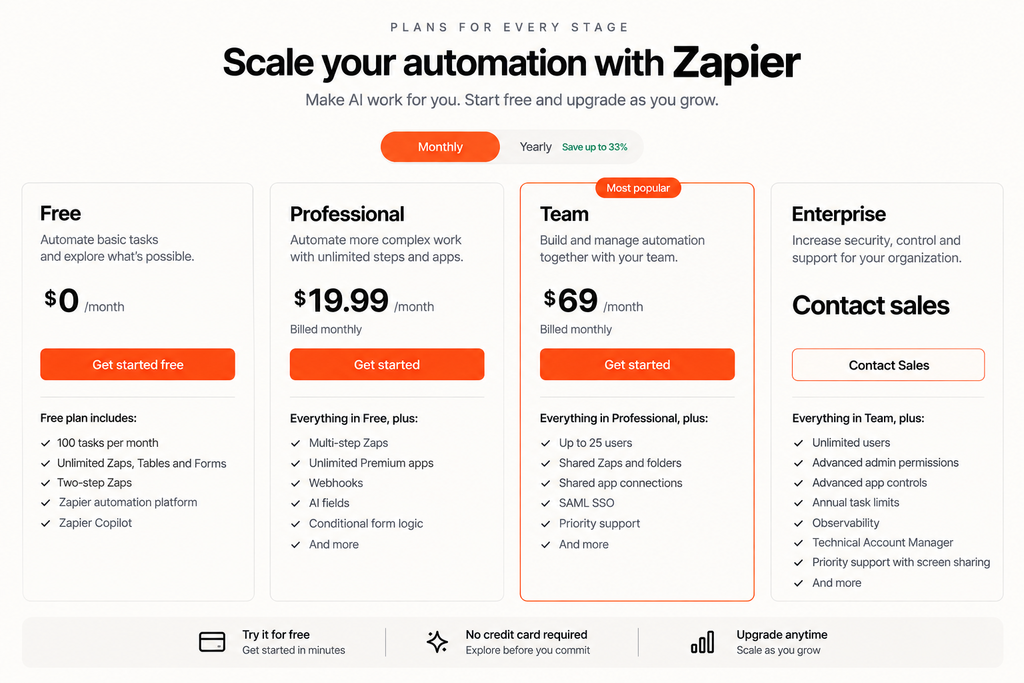
Free — $0/month
The Free plan is designed for users getting started with automation.
Current features include:
- 100 tasks per month
- Unlimited Zaps, Tables, and Forms
- Two-step Zaps
- Zapier automation platform
- Zapier Copilot
Professional — From $19.99/month
The Professional plan is aimed at users who need more advanced automation.
It includes features such as:
- Multi-step Zaps
- Unlimited Premium apps
- Webhooks
- AI fields
- Conditional form logic
- Additional automation capabilities
Team — From $69/month
The Team plan is designed for collaborative workflows.
It includes features such as:
- Up to 25 users
- Shared Zaps and folders
- Shared app connections
- SAML SSO
- Priority support
Enterprise — Custom Pricing
Enterprise is designed for larger organizations that need additional administration and governance.
Features include:
- Unlimited users
- Advanced admin controls
- Advanced deployment options
- Annual task limits
- Observability
- Technical Account Manager
- Priority support with screen sharing
What About AI Usage?
AI usage is now tied into Zapier’s broader task-based pricing system.
For AI by Zapier, the current model tiers use different task multipliers:
| AI Model Tier | Task Multiplier | Tool Support |
|---|---|---|
| Standard | 1× | No |
| Advanced | 3× | Yes |
| Premium | 5× | Yes |
Zapier states that the Premium tier is the default for new AI by Zapier steps on paid plans. AI task usage can increase when the AI calls external tools.
This is worth understanding before building large AI-heavy workflows.
The cost isn’t simply based on how many times you click “Run.”
The complexity of what the AI does can affect task usage.
Is Zapier Expensive?
That depends heavily on what you automate.
For a simple workflow that runs occasionally, the Free plan may be enough to experiment.
For a business running hundreds or thousands of automated operations, task usage becomes much more important.
AI adds another variable because more advanced models and tool calls can consume more tasks.
The practical approach is to estimate:
How often will the workflow run?
×
How many steps does each run contain?
×
How much AI processing is involved?
This gives you a better idea of the plan and task capacity you may need.
What Makes Zapier Different?
There are many automation tools available today, so Zapier’s value isn’t simply “automation.”
Its main differentiators are the combination of:
Large app ecosystem + workflow automation + AI + data + forms + developer tools
A user can start with a simple two-step automation and gradually build something much more sophisticated.
For example:
Form
↓
AI classification
↓
Conditional path
↓
CRM update
↓
Database record
↓
Slack notification
↓
All of these pieces can exist inside one larger automated system.
The Advantages of Zapier
Huge App Ecosystem
With 9,000+ app integrations, Zapier can connect many of the tools businesses already use.
Easy to Start
The basic trigger-and-action model is relatively easy to understand.
AI Can Be Added to Existing Workflows
You don’t necessarily have to rebuild your entire automation strategy around AI.
AI can be inserted into specific steps where interpretation or generation is useful.
Scales From Simple to Complex
A user can start with a small automation and gradually introduce filters, paths, webhooks, AI, Tables, Forms, and other functionality.
Strong Ecosystem
Zapier’s large integration library makes it possible to connect tools that would otherwise remain isolated.
Limitations to Keep in Mind
Task-Based Pricing Can Become Complicated
Once workflows become large, task consumption becomes something you need to monitor.
AI model tiers and tool calls add another layer to that calculation.
Not Every Automation Needs AI
AI is useful when a workflow needs interpretation, classification, generation, or flexible decision-making.
If the rule is simply:
“When an order arrives, add a row to a spreadsheet.”
traditional automation may be enough.
Adding AI doesn’t automatically make a workflow better.
Complex Workflows Require Planning
As a Zap grows from two steps into a large workflow with branches, conditions, AI, and multiple applications, it becomes increasingly important to design and test it carefully.
Automation saves time only when the automation itself is reliable.
Who Should Use Zapier?
Zapier can be useful for:
Freelancers
Automate repetitive administrative work without building custom software.
Content Creators
Connect publishing, content management, research, and communication tools.
Small Businesses
Automate leads, customer communication, forms, and internal processes.
Marketing Teams
Connect campaign tools, CRMs, forms, analytics, and communication platforms.
Operations Teams
Reduce repetitive data entry and connect systems used across departments.
Developers
Use Zapier’s APIs, SDK, webhooks, and MCP capabilities to integrate automation into more technical workflows.
Who May Not Need Zapier?
Not every user needs an automation platform.
If you only use a few applications and rarely repeat the same workflow, manually handling tasks may be simpler.
Zapier becomes more useful when you notice yourself repeatedly doing something like:
“Whenever this happens, I always do these five things.”
That sentence is often a good sign that automation could help.
Final Thoughts
Zapier has evolved considerably from its original image as a simple tool for connecting two applications.
Today, it is positioning itself as a broader automation and AI orchestration platform, combining workflows, AI capabilities, data storage, forms, app integrations, MCP, and more.
The most interesting part isn’t any individual feature.
It is the ability to combine them.
A traditional automation might simply move information from one application to another.
A modern Zapier workflow can instead:
Collect information → understand it with AI → make a decision → take action → update data → notify the right person.
That changes automation from simple task repetition into something closer to a connected operating system for everyday digital work.
For someone who spends hours moving information between apps, managing repetitive processes, or coordinating multiple tools, Zapier can be a useful way to turn those repeated actions into automated workflows.
And because you can start with a relatively simple workflow and build from there, you don’t have to automate your entire business on day one.
Start with one repetitive task.
Then see what else can be connected.
Frequently Asked Questions
What is Zapier used for?
Zapier is used to connect applications and automate repetitive workflows. A workflow can start with an event in one app and trigger actions across other applications.
How many apps does Zapier support?
Zapier currently advertises integrations with more than 9,000 applications.
Is Zapier free?
Yes. Zapier has a Free plan that currently includes 100 tasks per month, unlimited Zaps, Tables, and Forms, and two-step Zaps.
How much does Zapier cost?
The main platform currently starts at Free, while Professional starts from $19.99/month, Team from $69/month, and Enterprise uses custom pricing.
Does Zapier use AI?
Yes. Zapier includes AI features for workflow creation, text processing, classification, summarization, decision-making, and agentic task execution.
What is AI by Zapier?
AI by Zapier is an AI-powered step that can be added to Zap workflows. It can use AI models to process information and, on supported tiers, interact with tools and connected applications.
Does Zapier have AI agents?
Zapier has been moving its standalone Agents experience into AI by Zapier, allowing agentic reasoning and tool use to operate directly inside the Zap editor.
Is Zapier difficult to learn?
Basic Zaps are relatively straightforward because the trigger-and-action concept is simple. More advanced workflows involving branching, webhooks, AI, and multiple applications require more planning.
Is Zapier useful for small businesses?
Yes. Small businesses can use it to automate repetitive processes such as lead collection, customer follow-ups, notifications, data entry, and internal workflows.
Does Zapier replace other apps?
Usually, no. Zapier is primarily designed to connect the applications you already use rather than replace all of them.
Is Zapier worth trying?
If you repeatedly move information between applications or perform the same sequence of digital tasks, Zapier can be worth testing. The Free plan provides a way to experiment before committing to a paid plan.