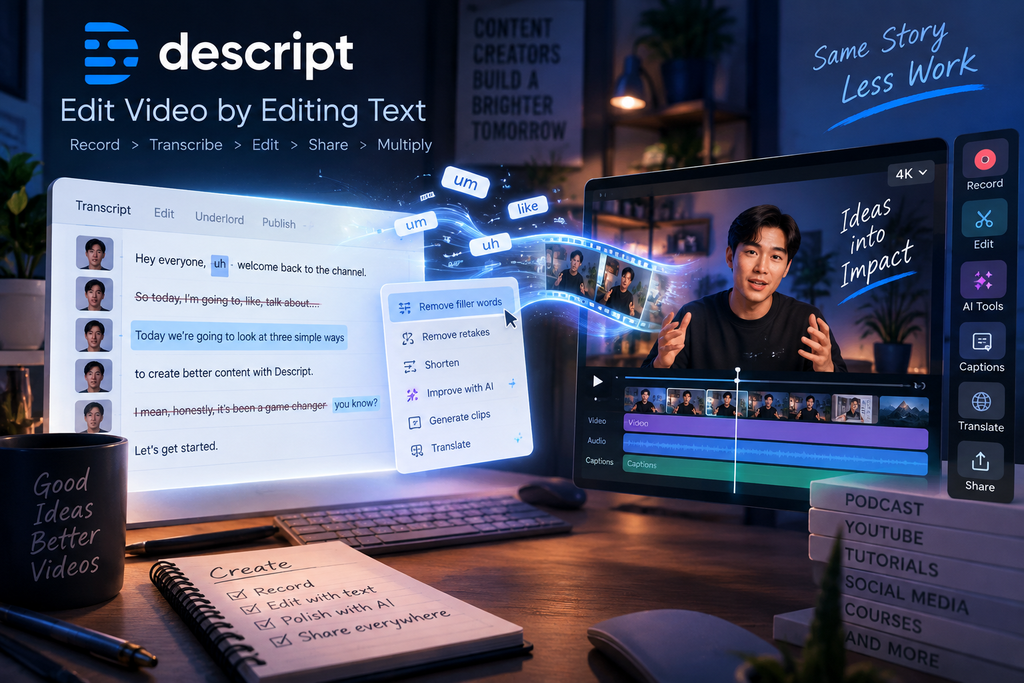
Editing a video usually means jumping between a timeline, dozens of clips, and a pile of tiny cuts. Descript takes a different approach: it turns your recording into text, then lets you edit the video by editing the words.
That idea sounds simple, but it changes the workflow considerably. Instead of constantly scrubbing through footage to find a sentence, remove a mistake, or cut out a long pause, you can work directly from the transcript. Descript then connects those text changes back to the underlying video and audio.
The platform has also grown well beyond transcript-based editing. Its current workflow includes AI-assisted editing through Underlord, audio cleanup, captions, screen recording, layouts, generated visuals, translation, clips, and tools for turning one piece of content into multiple formats.
But convenience isn’t the same as versatility. The more important question is whether Descript actually makes content production easier—or whether its unusual workflow becomes limiting when projects get more complicated.
What Is Descript?
Descript is a video and audio creation platform built around text-based editing.
After you import or record content, Descript transcribes the spoken audio. The transcript becomes an interactive editing layer: delete a sentence, move a section, or remove unwanted words, and the corresponding portion of the recording changes with it.
This makes Descript particularly interesting for content where the spoken message is the main focus.
Think:
- YouTube talking-head videos
- Podcasts
- Interviews
- Tutorials
- Webinars
- Online courses
- Product demos
- Marketing videos
- Screen recordings
The timeline still exists when you need more traditional control, but you don’t have to make it the center of your workflow.
The Feature That Makes Descript Different: Edit Video Like Text
This is the part that deserves the most attention.
Traditional video editors generally ask you to think visually. You locate a clip on a timeline, move the playhead, cut the footage, adjust the clips, and repeat.
Descript starts from a different question:
What if the easiest way to edit someone talking is simply to edit what they said?
Once your recording is transcribed, the workflow feels much closer to editing a document.
If someone says:
“Today we’re going to look at three features…”
and you decide the sentence isn’t necessary, you can remove it from the transcript. The corresponding video and audio are removed as well.
You can also rearrange sections, cut repeated phrases, remove filler words, and tighten the script without repeatedly hunting through the footage. Descript’s own current workflow specifically supports text-based editing, filler-word removal, retake removal, and transcript-based editing.
For spoken-content creators, this can remove a surprisingly large amount of repetitive editing work.
Underlord: Descript’s AI Co-Editor
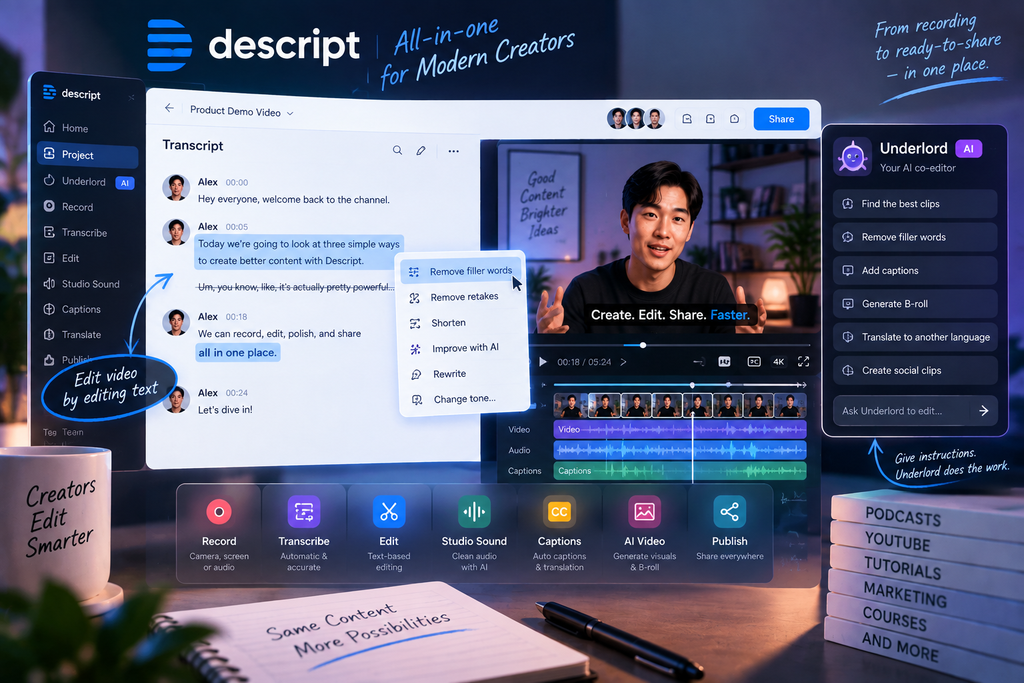
Descript’s biggest recent development is Underlord, its AI editing assistant.
Rather than treating AI as a collection of separate buttons, Descript has been moving toward an assistant that can work with the project itself. Underlord can read a script, analyze footage, make editing decisions, and perform multiple edits based on natural-language instructions.
For example, instead of manually performing several cleanup steps, you can ask Underlord to tighten a section, remove filler words, select useful clips, or make other changes.
Descript has also been developing Underlord’s ability to understand what’s actually happening on screen rather than relying only on the transcript. That matters when you need to locate a visual moment that isn’t explicitly described by someone’s speech.
The bigger idea here is interesting:
You aren’t just editing with AI. You’re giving the AI instructions inside the editor and letting it carry out the editing work.
That makes Underlord more useful for repetitive production tasks than a simple AI writing assistant.
Audio Cleanup Without a Complicated Workflow
Video quality isn’t only about visuals. Poor audio can make otherwise good content difficult to watch.
Descript includes AI-powered audio tools designed to clean up recordings and make spoken content sound more polished. Its workflow includes background-noise removal and other one-click refinements, while tools such as Studio Sound are aimed at improving imperfect recordings.
This is especially useful for:
- Home recordings
- Podcasts
- Interviews
- Screen tutorials
- Remote meetings
- Videos recorded without ideal microphones
The advantage is less about giving experienced audio engineers more control and more about reducing the amount of technical work required from ordinary creators.
Remove Filler Words and Retakes
One of the easiest ways to make spoken content feel tighter is to remove the parts that don’t contribute anything.
Descript can identify filler words and retakes, allowing creators to clean up recordings without manually searching through the entire timeline.
That’s particularly useful when recording naturally rather than reading a perfectly prepared script.
Instead of stopping every time you make a mistake, you can keep talking and clean things up later.
That changes the recording process itself: you can focus more on getting the idea out and worry about polishing it afterward.
Screen Recording and Tutorial Creation
Descript isn’t limited to camera footage.
Its workflow also supports screen recording, making it useful for tutorials, software demonstrations, presentations, and educational content. Screen recordings can live alongside the transcript and other media, allowing creators to edit the spoken explanation and visual content together.
For example, a software tutorial could be recorded first and polished afterward by:
- Removing unnecessary explanations
- Cutting mistakes
- Cleaning the voice
- Adding captions
- Rearranging sections
- Adding visual layouts
- Creating shorter versions
That makes Descript particularly practical for creators who produce instructional content regularly.
Captions, Translation, and Content Repurposing
Creating the original video is only part of the job.
Modern content often needs multiple versions: a full YouTube video, short clips, vertical content, captions, translated versions, or promotional snippets.
Descript’s current workflow is built around this idea of Multiply—taking one piece of content and adapting it for different destinations. Its platform supports captions, clips, translation, and reformatting for platforms such as YouTube, TikTok, and LinkedIn.
This can be valuable for creators and marketing teams that don’t want to rebuild every piece of content from scratch.
The practical advantage is simple:
One recording can become the source material for several pieces of content.
AI Visuals and Video Generation
Descript has also moved beyond editing existing footage.
Its current AI video workflow can help generate scripts, create scenes, produce custom B-roll, animate images, and turn other content such as documents or slides into video.
This makes the platform increasingly useful for content that starts with an idea rather than an existing recording.
You could begin with a script, presentation, blog post, or screen recording and build it into a more polished video workflow from there.
However, this is also an area where expectations should be realistic. AI-generated visuals can accelerate production, but they don’t eliminate the need for creative decisions. You still need to check whether the result fits the message, pacing, and visual style of the video.
Collaboration for Teams
Descript also supports collaborative workflows, allowing multiple people to work around the same project rather than passing large video files back and forth.
That can make a difference for marketing teams, agencies, podcasts, and organizations where one person records while another reviews or edits.
The document-like structure is particularly useful here because comments, scripts, transcripts, and media can exist within the same overall workflow.
Instead of thinking of the project as just a video file, Descript treats it more like a shared content workspace.
Where Descript Works Best
Descript makes the most sense when the content is driven by speech.
YouTube creators
Talking-head videos, tutorials, commentary, interviews, and educational videos can benefit heavily from transcript-based editing.
Podcasters
The transcript-first workflow fits naturally with podcast production, especially when removing mistakes, tightening conversations, and creating clips.
Marketing teams
Product demos, explainers, webinars, social clips, and internal communications can all be produced from the same source material.
Educators and course creators
Screen recordings, lectures, tutorials, and lessons are a natural fit because spoken explanations can be edited directly from the transcript.
Small teams
Descript can reduce the amount of specialized editing knowledge required to produce polished content, which can be useful when there isn’t a dedicated video editor.
Where Descript May Not Be the Right Fit
The text-based workflow is powerful, but it isn’t designed to replace every type of video editor.
If your project depends heavily on:
- Complex motion graphics
- Detailed keyframe animation
- Advanced visual effects
- Highly precise color grading
- Cinematic compositing
- Extremely detailed timeline manipulation
you may eventually want a more traditional professional editor.
There is also a more fundamental limitation: Descript’s biggest advantage is strongest when the content has a meaningful spoken or scripted component.
For a purely visual project where the story depends primarily on shots, movement, effects, and visual composition, the transcript isn’t necessarily the best foundation for editing.
AI also doesn’t remove the need for human review. An automated edit can make technically sensible changes while still getting the pacing or storytelling wrong. Descript itself describes Underlord as something that works under the creator’s direction rather than eliminating creative control.
Descript Pricing
Descript offers a Free plan, with paid plans adding more media capacity and access to additional features.
The current structure includes Free, Hobbyist, Creator, and Business tiers. The exact allowances for transcription, media hours, AI usage, and other features vary by plan, so the important thing is to compare the limits against how much content you actually produce rather than looking only at the monthly price.
For someone experimenting with text-based editing, the Free plan provides a straightforward way to test the workflow before committing.
For regular content production, the value of a paid plan depends heavily on how frequently you record, edit, and repurpose content.
Is Descript Worth Trying?
Descript’s biggest strength isn’t that it has more buttons than traditional editors.
It’s that it changes how you think about editing.
Instead of:
Timeline → Find clip → Cut → Preview → Repeat
the workflow can become:
Transcript → Edit words → Review video → Refine
That difference is small on paper but significant in practice.
If most of your content involves people speaking, Descript can turn many tedious editing tasks into something much closer to editing a document. Add Underlord, audio cleanup, captions, screen recording, repurposing, and AI-assisted production, and the platform becomes much more than a transcription tool.
The trade-off is that the same workflow that makes Descript approachable can feel less natural for highly visual or technically complex projects.
So the real question isn’t whether Descript can replace every video editor.
It’s whether your content is the kind of content that benefits from editing words instead of constantly editing a timeline.
If the answer is yes, Descript is worth exploring.
Ready to see how the workflow works for yourself? Try Descript and see whether text-based video editing fits the way you create content.