A meeting can end in 30 minutes, but the work created by that meeting often continues long after everyone leaves the call. Notes need to be organized, decisions need to be remembered, and someone still has to figure out what happens next.
Fireflies.ai is designed to take much of that work off your hands.
It records and transcribes conversations, generates AI-powered summaries, makes meetings searchable, and connects meeting information with other productivity and business tools. More recently, Fireflies has expanded into conversation intelligence and AI-powered workflows, making it more than a traditional meeting transcription service.
In this Fireflies.ai review, we’ll look at its main features, pricing, strengths, limitations, and the types of users who may get the most value from it.
What Is Fireflies.ai?
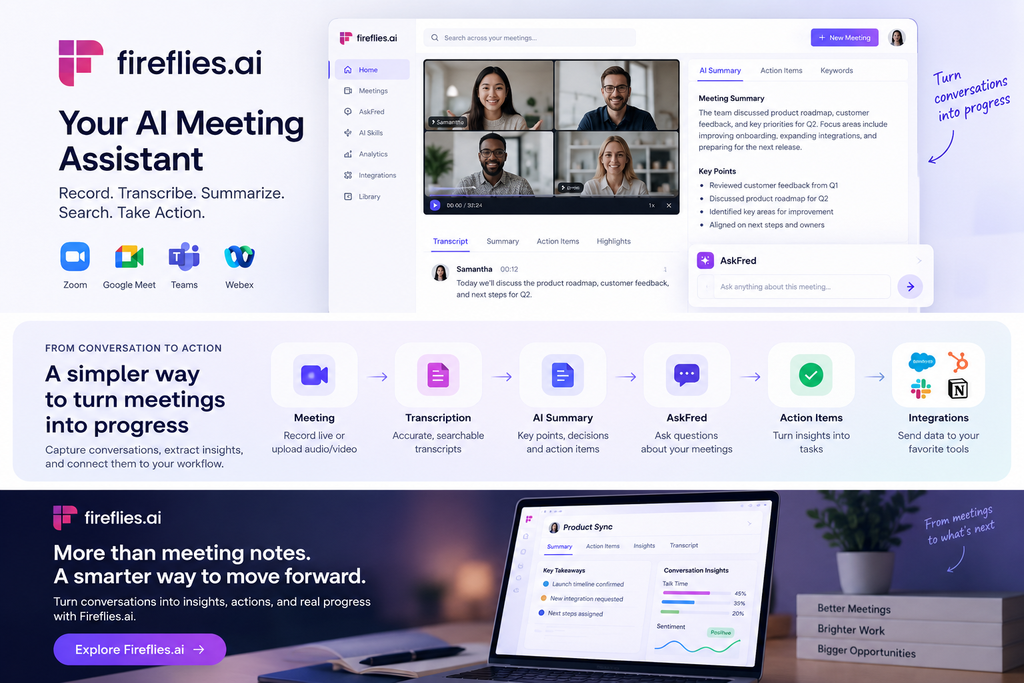
Fireflies.ai is an AI meeting assistant that records, transcribes, summarizes, and analyzes conversations.
It can work with popular meeting platforms including Zoom, Google Meet, Microsoft Teams, and Webex. Users can also capture conversations through Fireflies’ browser extension, desktop and mobile apps, or upload existing audio and video files for transcription.
The basic idea is simple:
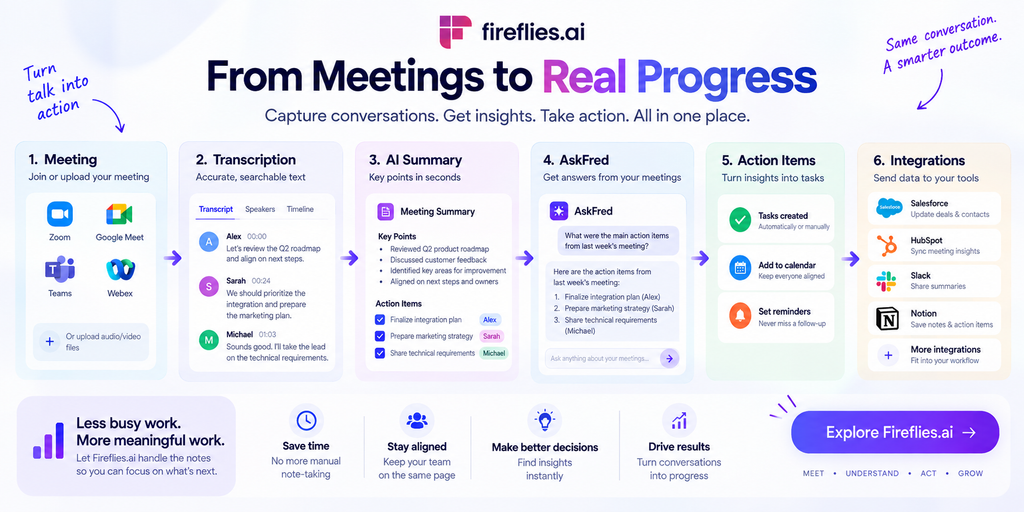
Capture the conversation → Transcribe it → Summarize it → Search and analyze it → Turn it into follow-up work
That last step is where Fireflies becomes more interesting than a basic transcription tool. Instead of treating meeting notes as the final product, the platform is increasingly designed to make conversation data useful across the rest of your workflow.
Fireflies.ai Features
AI Meeting Transcription
Transcription is still the foundation of Fireflies.ai.
Once a conversation is captured, Fireflies creates a searchable transcript that allows users to review what was said without relying entirely on handwritten notes.
The platform supports 100+ languages, along with features such as speaker recognition and automatic language detection.
Fireflies also supports uploaded recordings, so you aren’t limited to meetings captured live through a supported conferencing platform.
This can make it useful for:
- Interviews
- Sales calls
- Research conversations
- Podcasts
- Client meetings
- Internal team discussions
Fireflies advertises up to 95% transcription accuracy, but this figure should be viewed as a company claim rather than a guarantee. Actual results can vary depending on audio quality, accents, background noise, overlapping speakers, and specialized terminology.
AI-Powered Meeting Summaries
Reading an entire transcript after every meeting isn’t particularly efficient.
Fireflies uses AI to condense conversations into structured notes, helping users quickly identify the most relevant information.
Depending on the meeting and configuration, summaries can surface:
- Key discussion points
- Decisions
- Action items
- Important topics
- Meeting overviews
- Custom information
This is especially useful for people who attend many meetings throughout the week. Instead of opening every transcript, you can start with the AI-generated summary and return to the full recording or transcript when more context is needed.
Search Across Your Meetings
One of Fireflies’ most useful ideas is turning your meeting history into a searchable knowledge base.
Imagine remembering that an important decision was made during a meeting several weeks ago, but not remembering which meeting contained it.
Rather than manually opening recordings one by one, Fireflies lets you search your conversation history for relevant information.
For meeting-heavy teams, this can become increasingly valuable as the archive grows.
AskFred
Fireflies also provides AskFred, an AI interface for interacting with meeting information.
Instead of simply searching for a keyword, users can ask questions about their conversations and have Fireflies retrieve relevant information from their meeting data.
This changes the experience from:
“Find the transcript.”
to:
“Find the answer.”
That distinction becomes more important when a team has accumulated a large number of meetings.
AI Skills
Fireflies has expanded its AI capabilities through AI Skills, which are designed to perform specific tasks on meeting information.
The platform currently advertises more than 200 AI Skills, allowing users to extract or process information from conversations for different use cases.
For example, a team could use specialized AI processing to extract customer requirements, identify follow-up items, or structure information from sales conversations.
The exact usefulness of these capabilities depends on how well they fit into your existing workflow, but they represent an important shift from simple meeting transcription toward meeting automation.
Conversation Intelligence
Fireflies also includes conversation intelligence features aimed primarily at teams that need to analyze conversations at scale.
These features can examine areas such as:
- Speaker talk time
- Topics discussed
- Sentiment
- Custom AI filters
- Conversation trends
This can be particularly relevant for sales and customer-facing teams.
For example, a sales manager doesn’t necessarily want to read every sales call from beginning to end. Instead, they may want to identify recurring topics, understand how conversations are developing, or find specific moments across multiple calls.
That’s where conversation intelligence becomes more useful than ordinary meeting notes.
Integrations and Automation
A meeting assistant becomes much more valuable when the information it collects doesn’t stay trapped inside the meeting app.
Fireflies integrates with a range of business and productivity tools, allowing meeting information to become part of a larger workflow.
A simplified example might look like this:
Customer meeting → Fireflies transcript → AI summary → CRM → Follow-up
Another workflow could be:
Internal meeting → Action items → Team collaboration tool → Assigned tasks
This is particularly useful for organizations that already rely heavily on CRM, communication, and project-management software.
Fireflies’ broader direction is increasingly focused on taking action from meeting information rather than simply recording it.
Fireflies.ai Pricing
Fireflies.ai has a free plan as well as paid plans for individuals, teams, and larger organizations.
According to the current pricing information, the main tiers are:
| Plan | Annual price | Storage / transcription | Best suited for |
|---|---|---|---|
| Free | $0 | Limited | Trying the platform |
| Pro | $10/user/month | Expanded limits | Individual professionals |
| Business | $19/user/month | Unlimited | Teams |
| Enterprise | $39/user/month | Unlimited | Larger organizations |
Monthly billing is more expensive for the Pro and Business plans.
Free
The Free plan provides a way to test Fireflies without paying for a subscription.
It includes core transcription capabilities, but advanced features and usage are more limited.
For occasional users, this may be enough to determine whether an AI meeting assistant actually fits their workflow.
Pro
The Pro plan is aimed more at individual professionals and smaller-scale use.
It adds features such as expanded storage, video recording, and access to additional AI capabilities.
The annual price currently starts at $10 per user per month.
Business
The Business plan adds features designed for teams, including conversation intelligence and broader usage limits.
It currently starts at $19 per user per month when billed annually.
For organizations that want to analyze conversations across a team rather than simply generate individual meeting notes, this is where Fireflies becomes more relevant.
Enterprise
The Enterprise plan is intended for larger organizations that need additional administration, security, and compliance capabilities.
The current listed price is $39 per user per month when billed annually.
Enterprise also adds features such as SSO/SCIM, audit logs, and additional security and compliance controls.
One Pricing Detail to Watch
Fireflies uses an AI Credits system for certain AI-powered features.
That means the subscription price isn’t the only thing users should look at. If you expect to use advanced AI capabilities heavily, it’s worth checking how the relevant credit limits and consumption rules apply to your plan.
This is an important distinction because “having an AI subscription” doesn’t necessarily mean every AI function is unlimited.
Pros and Cons
Pros
- Automatic meeting transcription
- Supports 100+ languages
- AI-generated meeting summaries
- Searchable meeting history
- AskFred for interacting with meeting data
- Large collection of AI Skills
- Conversation intelligence for teams
- Integrations with business and productivity tools
- Free plan available
- Multiple ways to capture conversations
Cons
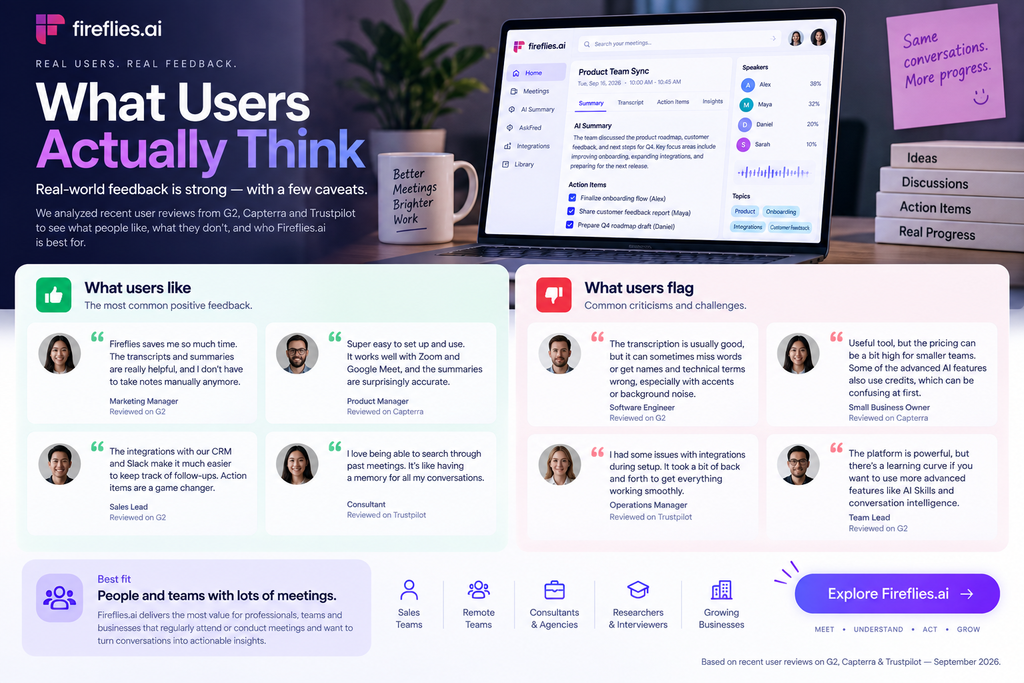
- AI-generated summaries can still require human verification
- Advanced features become more complicated to evaluate because of AI Credits
- Heavy users may need a paid plan
- Large meeting archives require good organization to remain useful
- Privacy and data-handling considerations are important for sensitive meetings
Is Fireflies.ai Easy to Use?
The basic concept is relatively straightforward.
Once Fireflies is connected to the relevant meeting workflow, much of the process can happen automatically. After a meeting, users can return to the transcript, summary, recording, and extracted information.
The complexity increases as you move into advanced functionality.
Users who only want “record my meeting and summarize it” may find many of the additional capabilities unnecessary.
On the other hand, teams that want to connect meeting information to CRM systems, analyze conversations, or automate follow-up work can make much more use of the platform.
In other words, Fireflies can be simple at the entry level while offering considerably more depth for advanced users.
Is Fireflies.ai Worth Using?
That depends largely on how often you have meetings and what you need to do with the information afterward.
If you only attend occasional meetings, manually taking notes may be sufficient.
But if your week is filled with sales calls, interviews, client conversations, team meetings, or research discussions, automatically capturing those conversations can save a considerable amount of repetitive work.
The strongest use case isn’t simply eliminating note-taking.
It’s being able to retrieve, understand, and reuse information from conversations after they are over.
That’s what makes features such as searchable transcripts, AskFred, AI Skills, and conversation intelligence important.
Final Verdict
Fireflies.ai has grown from an AI transcription assistant into a broader meeting intelligence and workflow platform.
Its core strengths are easy to understand: capture conversations automatically, turn them into transcripts and summaries, and make the information available later. The addition of searchable meeting history, AskFred, AI Skills, conversation intelligence, and integrations gives the platform considerably more potential than a basic note-taking application.
The main considerations are pricing complexity, AI usage limits, and the need to verify important AI-generated information rather than treating every summary as a perfect record.
For professionals and teams that spend a significant amount of time in meetings, Fireflies.ai provides a practical way to turn those conversations into searchable and reusable information.
Ready to explore Fireflies.ai?
Frequently Asked Questions
What is Fireflies.ai used for?
Fireflies.ai is used to record, transcribe, summarize, search, and analyze meetings and other conversations. It can also connect meeting information with other productivity and business tools.
Is Fireflies.ai free?
Yes. Fireflies.ai offers a Free plan with limited usage. Paid plans provide additional storage, features, and capabilities for individuals and teams.
Does Fireflies.ai work with Zoom and Google Meet?
Yes. Fireflies.ai supports popular meeting platforms including Zoom, Google Meet, Microsoft Teams, and Webex.
How accurate is Fireflies.ai transcription?
Fireflies advertises up to 95% transcription accuracy. Actual accuracy can vary depending on factors such as audio quality, accents, background noise, overlapping speakers, and technical terminology.
Does Fireflies.ai support multiple languages?
Yes. Fireflies.ai supports more than 100 languages and includes automatic language detection and speaker recognition.
What is AskFred in Fireflies.ai?
AskFred is Fireflies’ AI assistant for interacting with meeting information. It allows users to ask questions about conversations instead of manually searching through individual transcripts.
Is Fireflies.ai good for teams?
Fireflies.ai can be useful for meeting-heavy teams, particularly sales, recruiting, customer success, consulting, and remote teams. Features such as conversation intelligence, shared meeting information, and integrations become more relevant as team usage increases.
Does Fireflies.ai have AI usage limits?
Some advanced AI capabilities use an AI Credits system. Users should check the credit limits and consumption rules associated with their plan if they expect to use advanced AI features frequently.